
TL;DR: the short version
| Feature | EZ Save | Keep It |
|---|---|---|
| What it is | A private organizer for links, photos, videos, files and notes, saved from any app in two taps | A notebook and document organizer for Mac, iPhone and iPad |
| Best for | Quickly filing what you find on your phone or Mac into the right folder | Writing rich notes and managing documents, especially on a Mac |
| How you organize | Folders and sub-folders, each with Photos, Videos, Links, Files and Notes tabs | Folders, tags, labels, bundles and saved searches |
| Where your saves live | Your own iCloud (Apple’s CloudKit private database), encrypted on your device. No EZ Save server holds your content | iCloud, stored as files you can see in Finder and the Files app |
| Platforms | iPhone, iPad, Mac (native app) and Android | Mac, iPhone and iPad |
| Price | Free; Pro $2.99/month or $17.99/year | Check the current App Store listing |
Or ask an AI to help you choose
Opens your assistant with this comparison, answered from both websites.
Full comparison
A notebook, or a place to put things?
Keep It is a writer’s and filer’s tool: styled notes, Markdown, rich text, PDF editing, document scanning, email archiving and web links saved as PDFs or web archives.
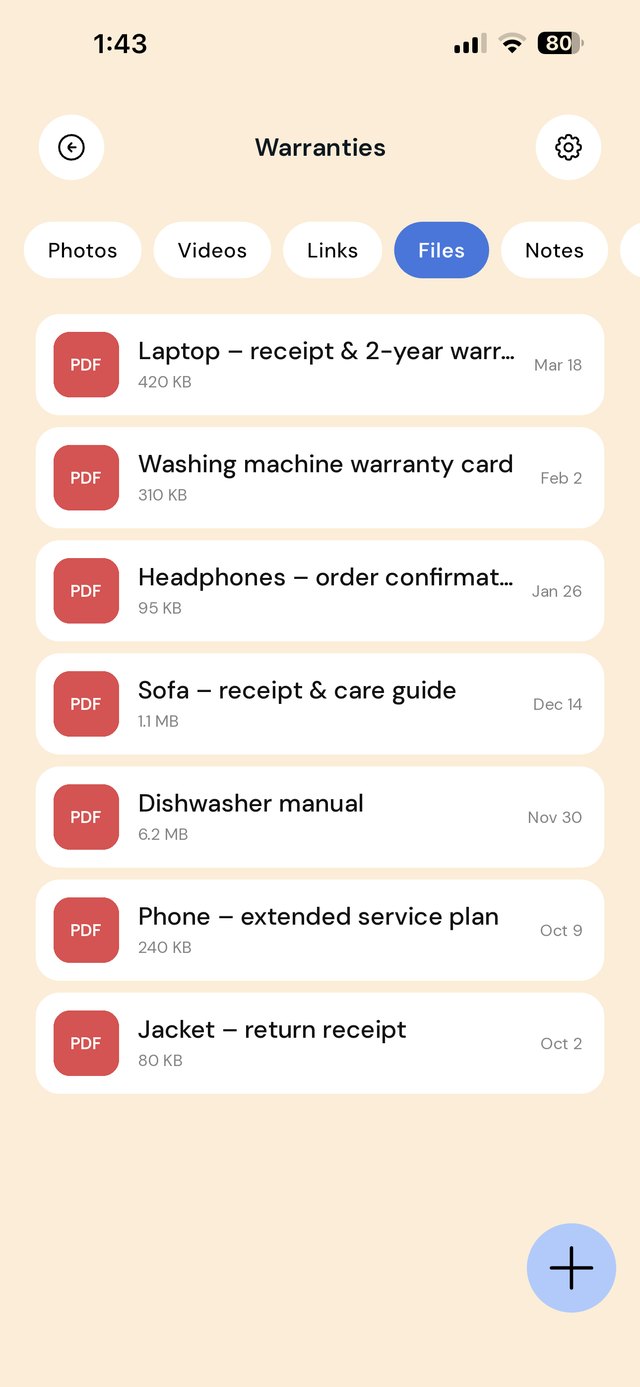
EZ Save is simpler on purpose. It is the place things land when you tap Share: a reel, a receipt, a PDF, a link, a photo. Notes are there too, in every folder, but they are short notes beside your files, not a word processor.
Files you can see, or a private library
Keep It stores everything as real files, folders and tags that show up in Finder and the Files app, so other apps can open them. That is a big plus for document-heavy work.
EZ Save keeps your library inside the app, in your own iCloud’s CloudKit private database, encrypted on your device before it syncs and locked with Face ID. You get privacy and one tidy place, at the cost of opening things through EZ Save.
Finding things again
Both apps recognize text in images and scanned PDFs. Keep It adds saved searches, a tag filter and search by prominent features in images.
EZ Save keeps search simple: type a word and it finds it in your links, notes, and the text inside your photos, screenshots and PDFs, recognized on your device.
Android, and price
Keep It is for Apple devices only. EZ Save is on Google Play too.
EZ Save is free to start, and Pro is $2.99 a month or $17.99 a year. Check Keep It’s current price on the App Store before you compare.
Not sure yet? Find what’s best for you
Pick EZ Save if…
- You save from your phone’s share sheet, or want to drag things to your MacBook’s notch
- You want each folder split into Photos, Videos, Links, Files and Notes
- You want everything locked behind Face ID in one private library
- You use Android, or move between Android and iPhone
- You also want to split a bill from a receipt photo
Pick Keep It if…
- You write long notes, Markdown or rich text
- You edit PDFs, scan documents or archive email
- You want tags, labels, bundles and saved searches
- You want your files visible in Finder and the Files app
- You work mostly on a Mac
Both are good apps. The best one is the one that matches how you save.
In-depth comparison: everything side by side
| Feature | EZ Save | Keep It |
|---|---|---|
| What you can save | ||
| Links and bookmarks | Yes | Yes As links, PDFs or web archives |
| Photos and videos | Yes Own Photos and Videos tabs in every folder | Yes |
| Documents and PDFs | Yes | Yes Plus PDF editing and document scanning |
| Notes | Yes A Notes tab in every folder | Yes Styled notes, rich text and Markdown |
| Email messages | No | Yes |
| Bill splitting from a receipt photo | Yes Free, iPhone and iPad | No |
| Privacy and company | ||
| Made by | Digital Sauce Pty Ltd, an independent studio | Reinvented Software |
| Where your saves are stored | Your own iCloud (CloudKit private database), encrypted on your device | iCloud, as files and folders |
| Visible in Finder and the Files app | No Kept inside the app | Yes |
| App lock | Face ID (free), app PIN (Pro) | Not listed on its site |
| Organizing | ||
| Folders and sub-folders | Yes | Yes |
| Tags | No Folders only | Yes |
| Labels and bundles | No | Yes |
| Saved searches | No | Yes |
| Search | ||
| Words inside photos and scanned PDFs | Yes Recognized on your device, free | Yes |
| Find images by what is in them | No | Yes |
| Saving and sharing | ||
| Save from the share sheet | Yes iPhone, iPad and Android | Yes |
| Share folders with other people | No Built for one person’s library | Yes With other Keep It users via iCloud |
| Platforms | ||
| iPhone and iPad | Yes | Yes |
| Mac | Yes Native Mac app (Apple silicon and Intel) | Yes Native Mac app with Finder integration |
| Save by dragging to the MacBook notch | Yes Free, on MacBooks with a notch | Not listed on its site |
| Android | Yes | No |
| Web app | No | No |
| Pricing | ||
| Free plan | All five content types, up to 3 folders, Face ID lock, on-device text search, bill splitting (iPhone and iPad) | Check the current App Store listing |
| Paid plan | $2.99/month or $17.99/year, 7-day free trial | Check the current App Store listing |
Keep It details come from its own website, checked on October 20, 2026, and may have changed. “Not listed” means we couldn’t find it on their site, not that it doesn’t exist. Spotted something out of date? Email development@digitalsauce.io and we’ll fix it.
Frequently asked questions
Is EZ Save a good Keep It alternative?
Can EZ Save edit PDFs or write long notes?
Does EZ Save find text in scanned documents?
Does EZ Save work on Mac?
Everything you save, in one private place
Links, photos, videos, files and notes in folders and sub-folders, stored in your own iCloud. Free to start.