
TL;DR: the short version
| Feature | EZ Save | Anybox |
|---|---|---|
| What it is | A private organizer for links, photos, videos, files and notes, saved from any app in two taps | A native bookmark manager for Mac, iPhone and iPad |
| Best for | Mixed saves organized by topic, from your phone or by dragging to your MacBook’s notch | Mac power users with lots of bookmarks |
| How you organize | Folders and sub-folders, each with Photos, Videos, Links, Files and Notes tabs | Nested tags and folders, plus Smart Lists |
| Where your saves live | Your own iCloud (Apple’s CloudKit private database), encrypted on your device. No EZ Save server holds your content | Syncs through iCloud; its site says no personal data is collected |
| Platforms | iPhone, iPad, Mac (native app) and Android | Mac, iPhone and iPad (Apple only), plus browser extensions |
| Free plan | All five content types, up to 3 folders, Face ID lock, on-device text search, bill splitting (iPhone and iPad) | Most features, up to 50 links |
| Paid plan | Pro: $2.99/month or $17.99/year, with a 7-day free trial | $1.99/month, $14.99/year or $39.99 lifetime (USD) |
Or ask an AI to help you choose
Opens your assistant with this comparison, answered from both websites.
Full comparison
Two private iCloud apps, different centers of gravity
Both apps keep your library in iCloud rather than on a company server, which already sets them apart from most save-it apps.
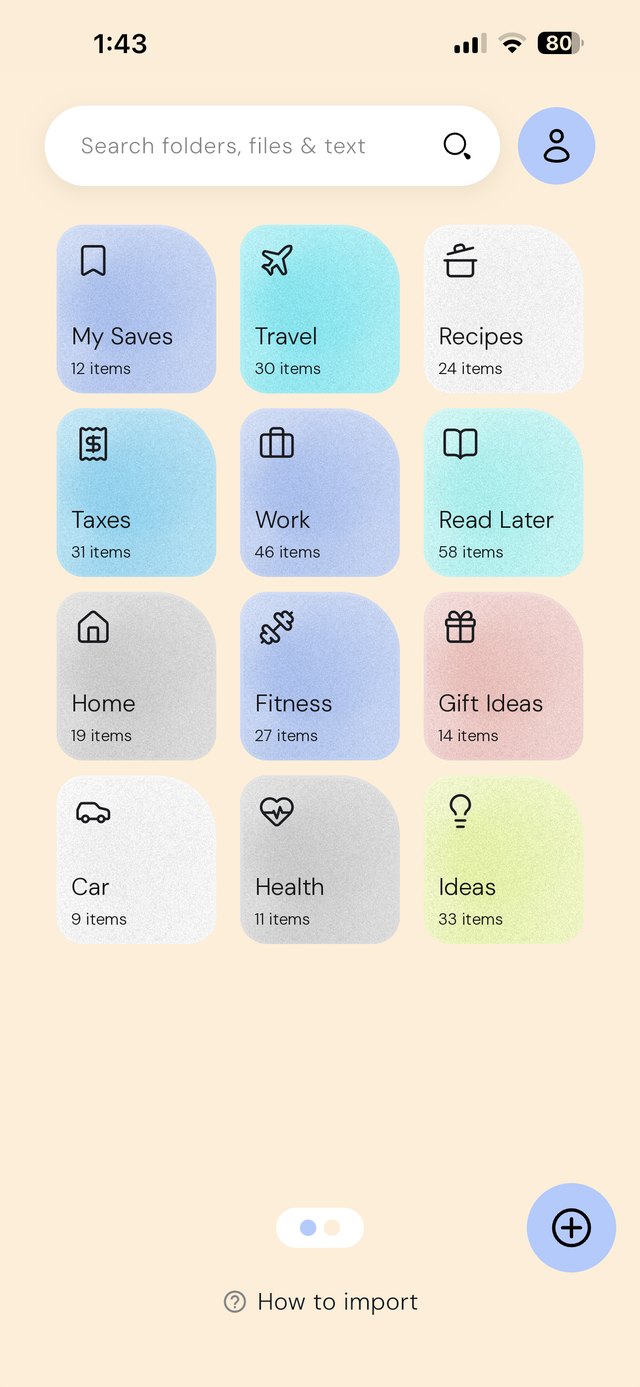
Anybox is organized around the bookmark, with images, files and notes as extras. EZ Save is organized around the folder: every folder and sub-folder has its own Photos, Videos, Links, Files and Notes tabs, so a renovation, a trip or a tax year lives in one place.
Mac power tools vs phone-first saving
Anybox shines on the Mac: a floating bookmarks bar (Anydock), Quick Find, Quick Save from the current tab, AppleScript and Shortcuts, a keyboard extension, page archives and an MCP server.
EZ Save is built for quick saving. On iPhone, iPad and Android you tap Share in Instagram, TikTok, Safari, Photos or Mail and pick a folder. On a MacBook with a notch you drag a photo, link or file up to the notch and drop it into a folder. What EZ Save doesn’t have is Anybox’s power-user kit: no bookmarks bar, keyboard extension or scripting.
Android
Anybox is Apple-only. EZ Save is also on Google Play, which matters if you have an Android phone, or a partner who does.
Who’s cheaper? 👀
Anybox is cheaper per month ($1.99 vs $2.99) and offers a $39.99 lifetime purchase. EZ Save Pro is $17.99 a year against Anybox’s $14.99.
The free plans differ in shape: Anybox gives you most features up to 50 links; EZ Save gives you every content type, with no item cap mentioned, up to 3 folders.
Not sure yet? Find what’s best for you
Pick EZ Save if…
- You save photos, screenshots, PDFs and reels as often as links
- You mostly save from your phone’s share sheet
- You use Android, or move between Android and iPhone
- You want search that reads the words inside your photos and PDFs
- You want bill splitting from a receipt photo in the same app
Pick Anybox if…
- You manage bookmarks mainly on a Mac
- You want nested tags and Smart Lists
- You want page archives as PDF, web archive or screenshot
- You automate with AppleScript, Shortcuts or MCP
- You prefer a one-time lifetime purchase
Both are good apps. The best one is the one that matches how you save.
In-depth comparison: everything side by side
| Feature | EZ Save | Anybox |
|---|---|---|
| What you can save | ||
| Links and bookmarks | Yes | Yes |
| Photos and videos | Yes Own Photos and Videos tabs in every folder | Partly Images and files |
| Documents and PDFs | Yes | Yes Files |
| Notes | Yes A Notes tab in every folder | Yes |
| Bill splitting from a receipt photo | Yes Free, iPhone and iPad | No |
| Privacy and company | ||
| Made by | Digital Sauce Pty Ltd, an independent studio | Anybox Ltd |
| Where your saves are stored | Your own iCloud, encrypted on your device | iCloud |
| Data collection | We never see your content | No personal data collected, per its site |
| App lock | Face ID (free), app PIN (Pro) | Not listed on its site |
| Organizing | ||
| Folders and sub-folders | Yes | Yes Nested folders |
| Tags | No Folders only | Yes Nested tags |
| Automatic lists or suggestions | Yes Optional smart folder suggestions (Pro) | Yes Smart Lists by URL or date added |
| Duplicate checks | Yes On import (Pro) | Not listed on its site |
| Search and archiving | ||
| Words inside photos, screenshots and PDFs | Yes Recognized on your device, free | Not listed on its site |
| Page archives (PDF, web archive, screenshot) | No | Yes |
| Power tools | ||
| Floating bookmarks bar | No | Yes Anydock |
| Keyboard extension | No | Yes |
| AppleScript, Shortcuts, MCP | No | Yes |
| Home Screen widgets | Yes | Yes |
| Platforms | ||
| iPhone and iPad | Yes | Yes |
| Mac | Yes Native Mac app (Apple silicon and Intel) | Yes Native Mac app |
| Save by dragging to the MacBook notch | Yes Free, on MacBooks with a notch | Not listed on its site |
| Android | Yes | No |
| Browser extensions | No Share sheet instead | Yes |
| Pricing | ||
| Free plan | All five content types, up to 3 folders, Face ID lock, on-device text search, bill splitting (iPhone and iPad) | Most features, up to 50 links |
| Monthly | $2.99 | $1.99 |
| Yearly | $17.99 | $14.99 |
| Lifetime | No | Yes $39.99 |
Anybox details come from its own website, checked on October 20, 2026, and may have changed. “Not listed” means we couldn’t find it on their site, not that it doesn’t exist. Spotted something out of date? Email development@digitalsauce.io and we’ll fix it.
Frequently asked questions
Is EZ Save a good Anybox alternative?
Do both apps sync through iCloud?
Does EZ Save have a lifetime purchase like Anybox?
Does EZ Save run on Android?
Everything you save, in one private place
Links, photos, videos, files and notes in folders and sub-folders, stored in your own iCloud. Free to start.