
TL;DR: the short version
| Feature | EZ Save | Splitwise |
|---|---|---|
| What it is | A private organizer with free bill splitting from a receipt photo | An expense-sharing app with running balances between friends, roommates and groups |
| Best for | One-off dinners, trips and weekends away | Ongoing shared costs like rent, utilities and regular groups |
| Receipt photos | Free: spots a bill in a photo you share and reads the total on your device | Receipt scanning and itemization with Splitwise Pro |
| How splits work | Evenly, by percentage or by custom amounts | Equal or unequal splits, with default group splits in Pro |
| Do friends need the app? | No. You send them the summary by message | Splitwise is account-based |
| Platforms | iPhone and iPad (bill splitting) | Web, iPhone and Android |
| Price | Bill splitting is free | Free plan; Pro removes limits and ads and adds receipt scanning |
Or ask an AI to help you choose
Opens your assistant with this comparison, answered from both websites.
Full comparison
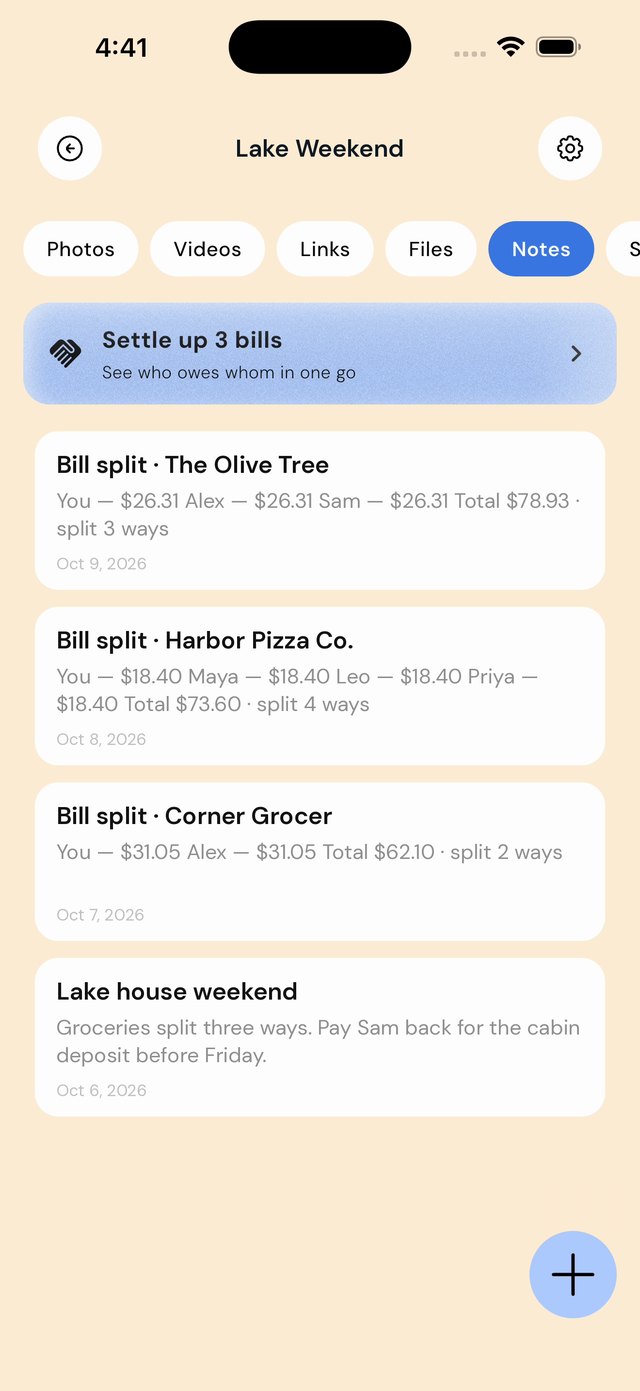
A one-off bill, or an ongoing tab?
Splitwise is built for running balances: everyone in a group adds expenses, and it keeps track of who owes whom over weeks or months. For housemates and regular travel groups, that is exactly right.
EZ Save is built for the moment the bill lands on the table. Share a photo of it to EZ Save, which spots that it looks like a bill, reads the total on your iPhone, and splits it evenly, by percentage or by custom amounts. Tick people off as they pay, or settle up several bills at once at the end of a trip.
Nobody has to sign up
With EZ Save, only you need the app. Your friends get the summary by message, so you’re not asking six people to download something to pay you back for a pizza.
Splitwise works best when everyone is on Splitwise, which is great for a group that splits things every week and a hurdle for a one-off dinner.
Receipts: totals vs items
Splitwise Pro scans a receipt and detects individual items so you can assign them to people. It also offers currency conversion, spending charts and, in the US, card transaction import.
EZ Save reads the total and splits that; it does not assign individual items or move money. In return the receipt stays filed in the trip folder with your bookings, photos and notes.
Who’s cheaper? 👀
EZ Save’s bill splitting is free for everyone on iPhone and iPad. Splitwise has a free plan; receipt scanning, itemization, unlimited expenses and an ad-free app are part of Splitwise Pro.
Not sure yet? Find what’s best for you
Pick EZ Save if…
- You want to split one bill quickly without anyone signing up
- You have a photo of the receipt and want it read for you, free
- You want the receipt filed with the rest of the trip
- You prefer splits evenly, by percentage or custom amounts
- You’re on iPhone or iPad
Pick Splitwise if…
- You share costs with the same people every week or month
- You need individual receipt items assigned to people
- You want running balances everyone in the group can see
- You need currency conversion or spending charts
- Your group uses Android or the web
Both are good apps. The best one is the one that matches how you save.
In-depth comparison: everything side by side
| Feature | EZ Save | Splitwise |
|---|---|---|
| Splitting | ||
| Spots a bill in a photo you share | Yes Automatically | Partly Receipt scanning with Pro |
| Reads the receipt on your device | Yes | Not stated on its site |
| Split evenly, by percentage or custom amounts | Yes | Yes |
| Assign individual receipt items | No Splits the total | Yes Itemization with Pro |
| Track who has paid | Yes | Yes |
| Settle up across several bills | Yes | Yes Running balances |
| Friends and accounts | ||
| Friends need the app | No You send them the summary | Yes Account-based |
| Your account | No account needed | Splitwise account |
| Money and extras | ||
| Moves money between people | No | Yes Splitwise Pay and Card listed on its site |
| Card transaction import | No | Yes Pro, US only |
| Spending charts | No | Yes Pro |
| Currency conversion | Not a listed feature | Yes Pro |
| Beyond bills | ||
| Receipt filed with the trip’s bookings, photos and notes | Yes | No |
| Save links, photos, videos, files and notes | Yes | No |
| Where your data lives | Your own iCloud, encrypted on your device | Splitwise’s servers |
| Platforms | ||
| iPhone and iPad | Yes | Yes |
| Android | No Bill splitting is iPhone and iPad only for now | Yes |
| Web | No | Yes |
| Pricing | ||
| Bill splitting | Free | Free plan with limits |
| Receipt scanning | Free | Splitwise Pro |
| Ads | Free version shows ads; Pro removes them | Free version has ads; Pro is ad-free |
Splitwise details come from its own website, checked on October 20, 2026, and may have changed. “Not listed” means we couldn’t find it on their site, not that it doesn’t exist. Spotted something out of date? Email development@digitalsauce.io and we’ll fix it.
Frequently asked questions
Is EZ Save a good Splitwise alternative?
Do my friends need to download EZ Save?
Is bill splitting in EZ Save free?
Can EZ Save split individual items on a receipt?
Everything you save, in one private place
Links, photos, videos, files and notes in folders and sub-folders, stored in your own iCloud. Free to start.